


 Log In

Free gifts available with your purchase
Create your Own Phases, from Mellow to Madness
Authentic plugin emulations of Bob Clearmountain’s Vintage Analog Flanger & Phaser Rack Modules
The trippy, undulating sound of flanging and phasing debuted in the ‘60s and ‘70s with songs like Small Faces’ “Itchycoo Park,” Led Zeppelin’s “Kashmir,” and Hendrix’s “Bold as Love.” And it’s made its mark on every decade since, playing key moments on tracks by David Bowie, Roxy Music, The Clash, The Cult, U2, Daft Punk, not to mention dozens of tracks by Van Halen.
Clearmountain’s Phases brings you the sounds of classic flanger and phaser processors used in mixing engineer Bob Clearmountain’s studio, meticulously modelling his rare, vintage flanger and phaser rack modules from the mid-seventies. The plugin adds Expanded settings modules, so you can replicate Bob’s advanced workflow, easily dialling in the distinct, engaging modulation effects heard on songs from the world’s most influential artists.
Clearmountain's Favourite Flanger at your Fingertips
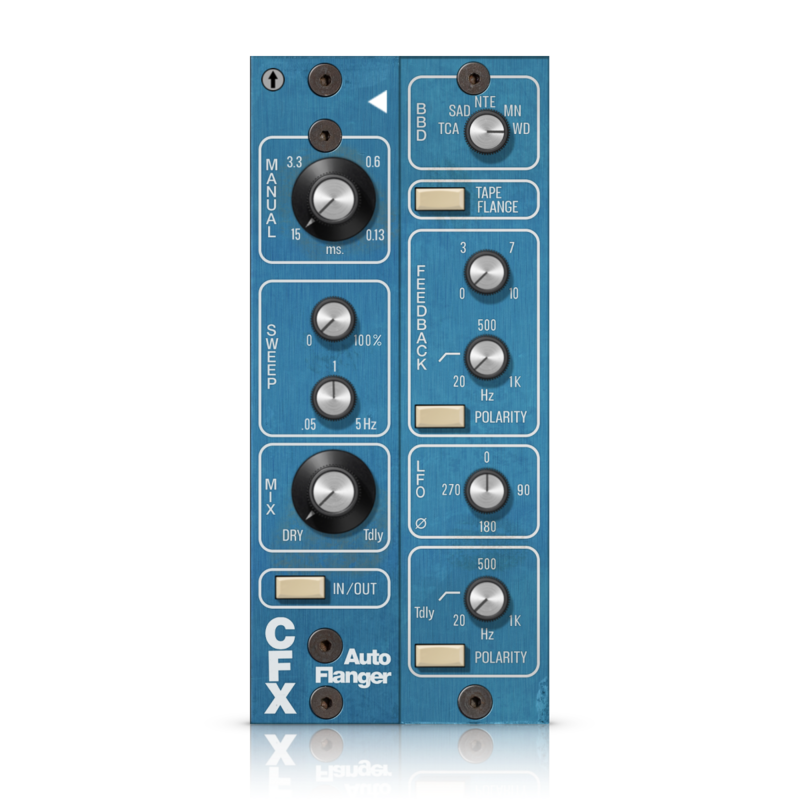
Originally created through a laborious process requiring two tape machines playing back the same material in sync, but with a slight varispeed on one of the machines, the Flanger effect required a lot of gear, setup and expertise to pull off. Clearmountain’s Phases brings Bob Clearmountain’s favourite hardware Flanger processor to your fingertips, with control over the original manual sweep, sweep oscillator and mix.
With Expanded controls including feedback, LFO Phase, high-pass filters, and polarity reverse controls, you can emulate workflows in the plugin that required external gear with the original modules. The true “zero crossing” Tape Flange mode reproduces the dramatic effect when two tape machines flange perfectly. You can even “swap out” the core bucket-brigade delay (BBD) chip to explore vastly greater sweep ranges. Finally, to really add the grit and flavour of the original hardware to your tracks, dial in your desired amount of distortion and aliasing.
It's not just a Phase... It's Feedback, LFO and Vintage Analog
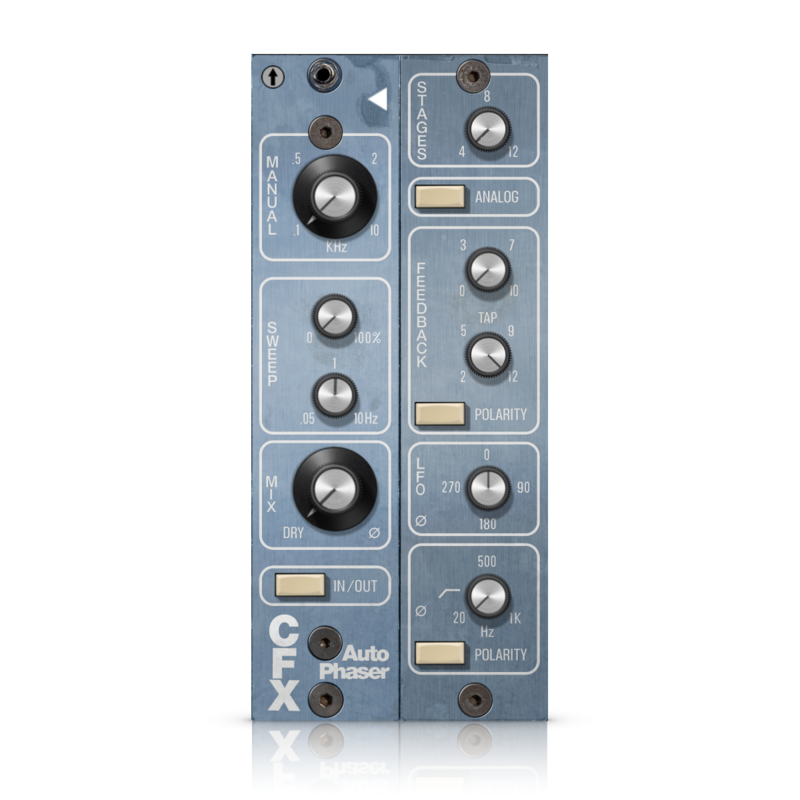
The Phaser offers a gentler modulation that Bob uses to create the quintessential watery, undulating electric piano, the occasional psychedelic drum kit, and more extreme textures in combination with the flanger. You’ll find many of the same Original and Expanded controls as the flanger – feedback, LFO Phase, high-pass filters and polarity reverse controls – for a consistent user experience. With the Stages knob, you can reproduce the sonic characteristics of hardware phasers from stompbox favourites to vintage hardware units to modern plugins. Dial-in feedback to intensify the effect with added resonance, then adjust the Feedback Tap knob for even more sonic variations. Engage the Analog button to more closely model the original hardware’s feedback implementation. Finally, send the plugin back in time with the Age trimpot, to reproduce the mellowing effects of ageing hardware components.
Configuration for your Sonic Imagination
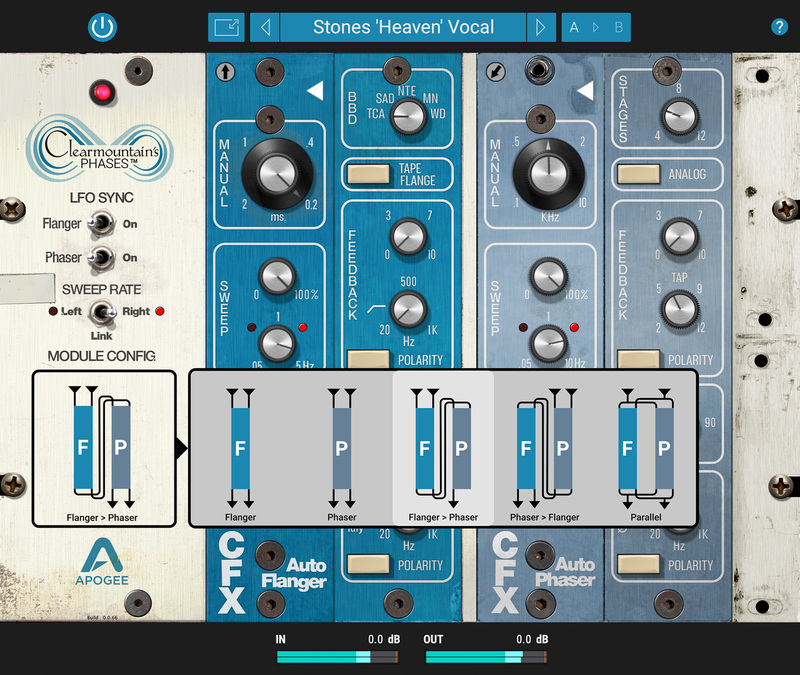
When Bob was looking to create a richer, more extreme texture, he’d send his tracks through both flanger and phaser modules, and you can do the same with the Module Config feature. Flange the phaser, phase the flanger, or apply both and mix – whatever achieves the sound in your imagination!
To add a swirling width that moves across the stereo soundstage, he’d patch in multiple modules, then set different sweep rates for the left and right sides of each module. Listen to Mick’s vocal on the Stones’ “Heaven” track, or Bowie’s “China Girl” recording to hear the result. You can recreate these unique sounds with the Module Config and Sweep Rate Select features.
Access Iconic Presets or Easily Dial-in your Own
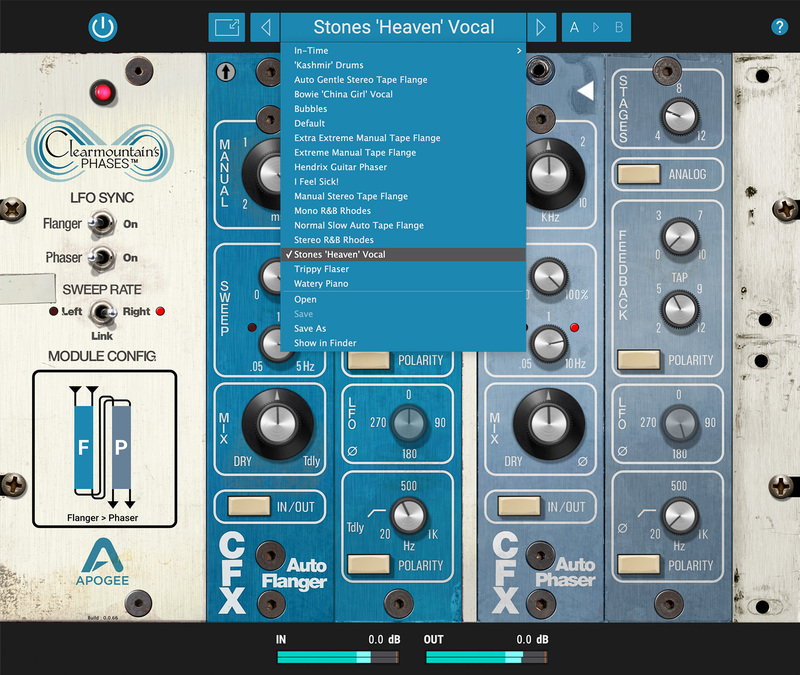
When the Clearmountain name is on the box, rest assured that Bob himself pored over every detail, and that includes the presets you get with the plugin. You don’t need an engineering degree to get started – instead, look over the shoulder of a master mixer!
Bob has carefully created each preset based on specific instruments and processing from his extensive catalogue of timeless hit mixes. Want to experience the Stones “Heaven” vocal sound described above? Simply load the preset!
Once you’ve unlocked the secrets of the presets, you’ll find it surprisingly easy to conjure your own Phases, from mellow to madness!
Features
- Authentic emulations of Bob Clearmountain’s vintage Flanger and Phaser Rack Modules.
- Phases Presets offers access to Clearmountain’s personal settings for iconic songs and applications.
- Use Module Config to combine the flanger and phaser for complex, evolving soundscapes.
- Expanded Settings Modules offer a universe of possibilities beyond the original units.
- Dial in the distortion, aliasing and component ageing of the hardware units, or keep it clean.
System Requirements
Mac
- macOS 10.14 Mojave and above (Intel / Apple Silicon supported) (64-bit only)
- VST, VST3, AU, AAX
Windows
- Windows 10 and above (64-bit only)
- VST, VST3, AAX
Please Note: A FREE Pace iLok account is needed in order to register this software (physical iLok Dongle is not required).
Tested & Supported DAWs:
- Pro Tools 12, Ultimate (Pro Tools 11 and lower not currently supported)
- Ableton Live 10
- Logic Pro 10
- Cubase 9.5 VST 1 & 2 (VST3 not implemented in this release).
Please Note: Any AUv2, VST2 or AAX fully compliant DAW should work.
Arkadi
Producer, Mixer & Multi-Instrumentalist
“...Wow! Just the default preset alone has instantly made it my go-to phaser and flanger plugin. It sounds so lush and thick and the presets are awesome, which to me is one of the most important aspects of a plugin."
Ryan “Skinny” Shanahan
Mixer / Engineer (Zedd, Katy Perry)
“If you’re looking for the sauce, this is THE sauce! Bob nailed this one, Phases sounds amazing. Its super easy to use, has great presets, and is tweak-ready to unlock endless creativity.”
Greg Wells
Grammy Award-winning Producer, Mixer, Songwriter & Multi-Instrumentalist
“As soon as I put “Phases” on a track, my smile muscles kicked in and haven’t stopped… I may require surgery. It’s absolutely amazing sounding, and Bob’s presets are unbelievable!”


