


 Log In

Free gifts available with your purchase

Erupting with Character and Vintage Quality
Unbeatable filters
Nothing beats a vintage-sounding, gritty and creamy cut-off filter. That's exactly what FabFilter Volcano has been known for since its first release in 2005. Today, Volcano 3 continues to deliver the best in creative filtering with new non-linear filter shapes and a completely redesigned interface that is an absolute delight to work with.
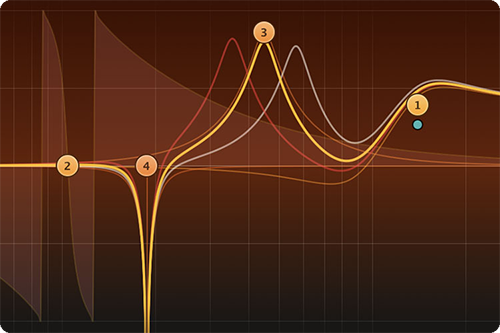
Non-linear, vintage filters
Volcano 3 contains four analog-sounding filters with flexible routing, each offering many filter shapes including non-linear bell and shelf filters. Different filter styles offer saturation and self-oscillation at high peak settings, just like classic, vintage filters.
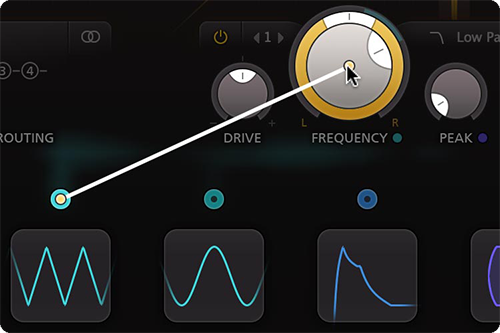
Easy drag-and-drop modulation
With all the XLFOs, envelope generators, envelope followers and MIDI sources you will ever need, Volcano 3 offers endless modulation possibilities. Setting up new modulation connections could not be easier: just drag and drop.
FabFilter goodies
Finally, you get all the usual FabFilter goodies: perfectly tuned knobs, MIDI Learn, Smart Parameter Interpolation for smooth parameter transitions, extensive help with interactive help hints, NEON and SSE optimization, and much more.
Features
- Fully redesigned, highly simplified interface, with an easier workflow, including a new design of modulation sources and floating slot panel
- Added new, vintage-sounding EQ-type filter shapes with the internal drive and non-linearities: bell, low/high shelf, notch and all-pass
- Ultra-flexible filter routing, including per-channel and mid/side modes
- Various interface sizes and full screen mode
- Endless modulation options, with all the 16-step XLFOs, XY controllers, envelope generators, envelope followers and MIDI sources you will ever need
- Introduced Drive setting per filter, adjusting the internal filter saturation, which allows for much more variety in sound and smoothness
- Improved the sound quality of overall feedback, the filters, and internal saturation
- Live modulation visualization for targets and sources
- High Quality option, enabling maximum internal oversampling for the best results
- Level/Pan per filter, which is especially useful when using parallel filter routings
- 6 dB/oct filter slope option
- Stereo and mono plug-ins available
- Undo, redo and A/B switch features
- Carefully designed and curated factory presets, plus support for earlier Volcano presets
- Large interactive filter display with optional piano display
- Interactive MIDI Learn
- Extensive help file with interactive help hints
System Requirements
Mac
- macOS 10.12 or higher (Intel or M1 Apple Silicon processor) (64-bit only)
- VST2, VST3, AU, AAX Native
Windows
- Windows 11, 10, 8, 7, or Vista (32 or 64-bit)
- VST2, VST3, AAX Native
Formats
All FabFilter plug-ins are available in VST, VST3, Audio Units, AAX Native and AudioSuite formats.
Awards


Computer Music
A monthly magazine that covers the topic of creating digital music on a computer.
"With a stonking sound and incredible flexibility, Volcano 2 is a must for anyone seeking a characterful all-in-one filter solution".
Noisia
World-famous Drum & Bass trio.
"The FabFilter Timeless 2 modular delay and Fabfilter Volcano modular filter has been our favourite delay and filter plug-ins for a while now."


