


 Log In
.jpg)
Free gifts available with your purchase


Groovy Percussion for Popular Styles
Make your tracks move and shake with guaranteed feel
The Missing Ingredient
You’ve cooked up your track, you’ve got bass and drums, melodies and chords and yet there’s something missing. Why does it still lack taste? Percussion! Think of salt as a spice – working dutifully in the background, a little bitter when consumed in masses. But no dish will come to full expression of flavours without it. The same goes for pop songs and percussion.
- 30 Styles – Combi Style and Solo Styles
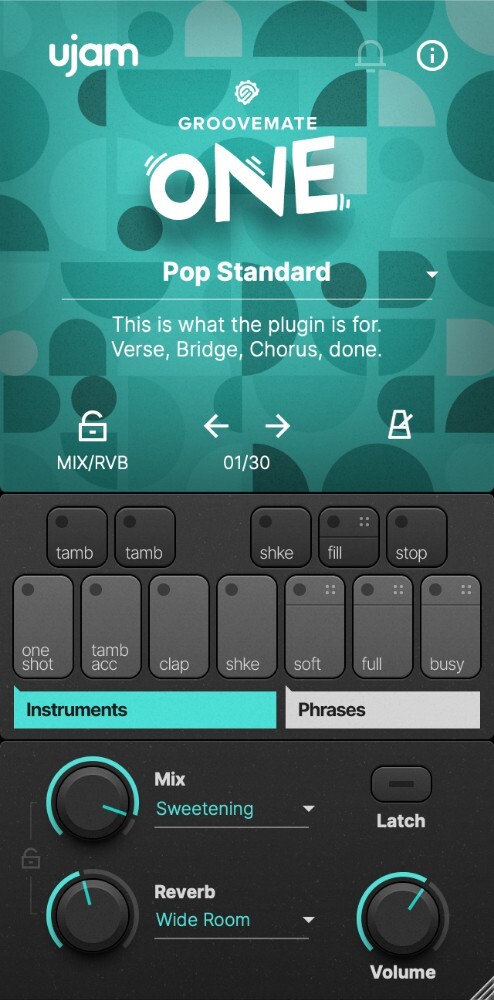
- 4 Sounds (Shaker, Claps, Tambourine, One-Shot shaker)
- 9 Mix & 4 Ambience Presets
- MIDI Drag and Drop
ONE… ,2, 3, 4
Groovemate ONE quickly and easily spices up your tracks with that important feel. Just select one of the ready-made phrases and adjust them to your needs. Or play the contained instruments yourself, directly via MIDI input: Claps, Tambourine, Regular Shaker, One-Shot Shaker.
Easy, Yet Complex
The secret of the vibe-machine: Percussionists often use sophisticated patterns that work against or around the basic beat and emphasis, such as 3-over-4 and syncopations. Playing or programming these yourself might be tricky unless you’re a percussionist yourself. With Groovemate ONE, you just browse through the presets and pick what works for you.
Features at a Glance
Get to know the Groovemate ONE features.
- Pick a Preset - Create your music without overthinking! Pick any inspiring preset and get to work instantly.
- In Sync - Trigger patterns that are instantly and perfectly in sync with the rest of your session.
- Make your songs shine - Get ready to move, shake, rattle, and roll!
System Requirements
Operating Systems
- Windows 7 or later (64-bit only)
- macOS 10.14 - macOS 14 (64-bit only)
For up-to-date info on UJAM products support for VST3, AAX, and Apple Silicon, please refer to the UJAM website.
Minimum Requirements
- 4 GB of RAM
- 0.09 GB of free Disk Space
- 1280 x 768px Display
- Internet Connection
Plugin Formats
- VST, AU 2
- AU 2 version is only compatible with Logic Pro X and newer.
Supported Standards
- MIDI
Additional Information
- Comes as downloadable installer files.
- Authorize by email address and password for ujam.com within the plugin.
- If you want to move your .blob files to an external drive, UJAM recommends the use of an SSD to prevent dropouts.
Reviews Summary
While it aims to provide a helpful overview, it may not capture every perspective or detail. We encourage you to read individual reviews to make an informed decision.
Overall, users praise the plugin as an intuitive, affordable, and effective tool for quickly adding simple percussion layers like shakers, tambourines, and claps to their tracks. Reviewers highlight its user-friendly interface, seamless workflow, and helpful MIDI drag-and-drop feature. While sentiment is predominantly positive, a few users noted limitations in loop variety and sound quality compared to dedicated sample libraries, and one user mentioned playback glitching when looping in Reaper.


