/ Synth Presets / WaveOSC Expansion Pack: Modern Trap
Plugin Boutique Presets

WaveOSC Expansion Pack: Modern Trap

4.9 (13 Reviews)
$5.00 $19.00

73% off until Dec 08

Main Image
Main Image
Modern Trap
Buy Now
Product information

Windows Down. Volume Up.

Arm yourself with the ultimate arsenal of sounds to dominate the trap scene. Trap Essentials for WaveOSC delivers a sonic powerhouse of hard-hitting drums, menacing basslines, and soaring melodies. Unleash your creativity and craft tracks that rattle the windows.

Modern Trap for WaveOSC brings a versatile palette of sounds to your fingertips, ensuring your tracks maintain that unmistakable trap energy, grit, and finesse.

Features

  • 20 deep bass presets
  • 5 FX presets
  • 3 rich key presets
  • 13 punchy leads
  • 10 atmospheric pads
  • 10 crisp pluck presets
  • 3 seamless transition presets

System Requirements

  • Requires an existing copy of WaveOSC to use.
Installation Instructions
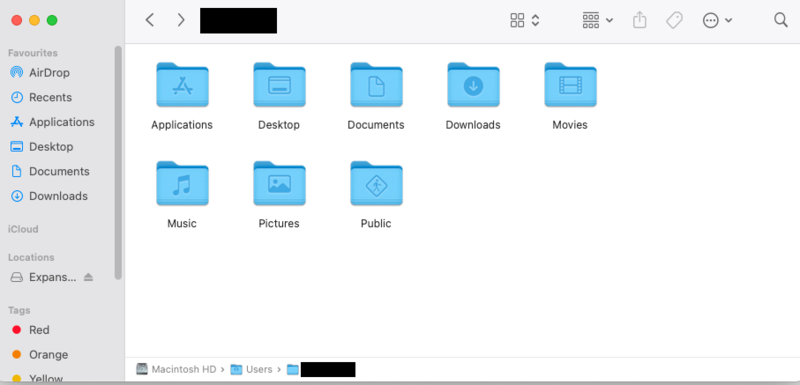
Mac

1. Head to your Plugin Boutique User Account, and download the correct package for your system. Extract the .zip file to your system.

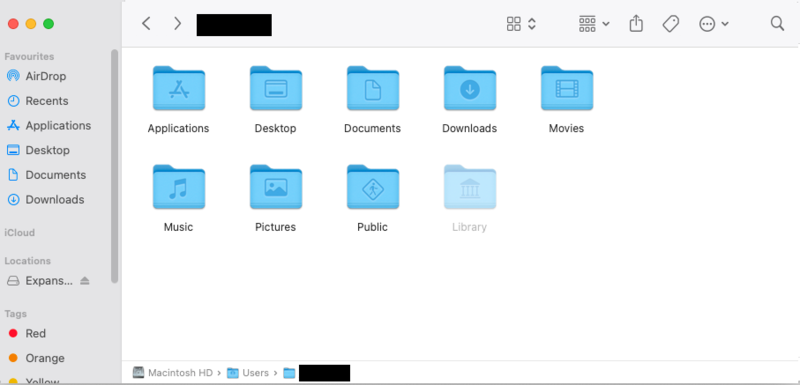
2. Open a new Finder window, and navigate to the following path: 'Macintosh HD > Users > [YOUR USER PROFILE]'.

3. Use the keyboard shortcut 'Command, Shift, . (period)' to expose hidden folders, including 'Library'.

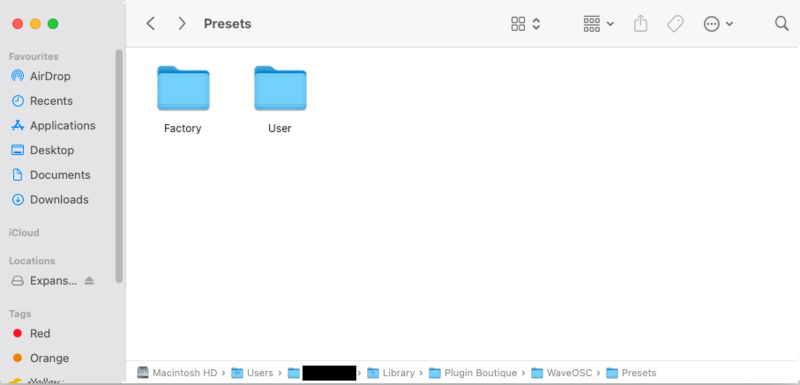
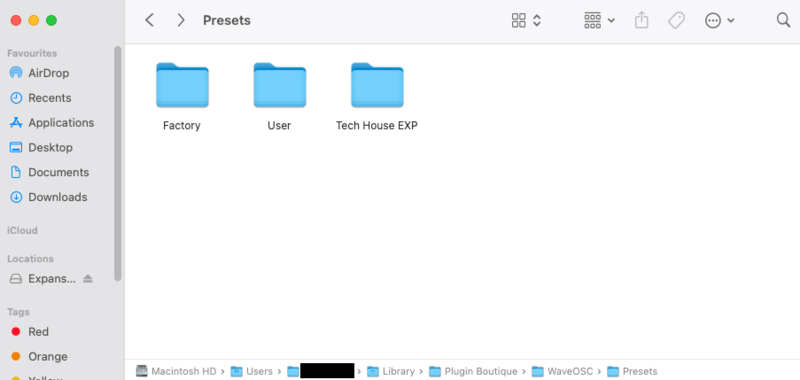
4. Navigate further to the following path: 'Macintosh HD > Users > [YOUR USER PROFILE] > Library > Plugin Boutique > WaveOSC > Presets'.

5. Drag and drop, or otherwise move/copy the Presets folder from within the download package obtained in step 1 to this location.

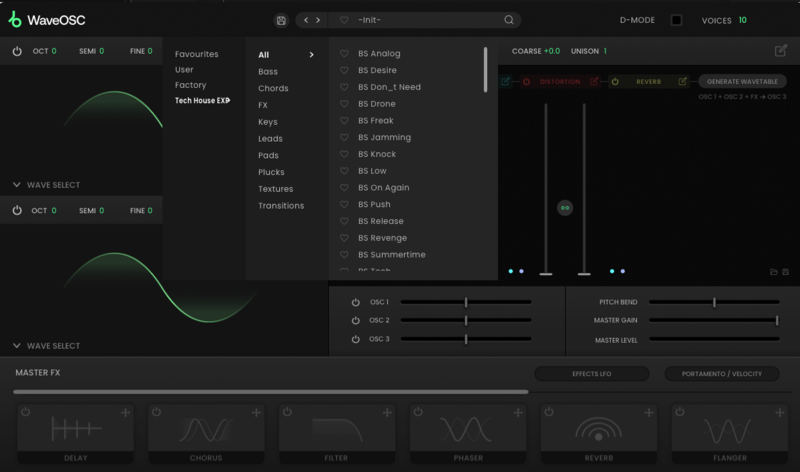
6. Launch WaveOSC within your DAW, and enjoy your presets!

Windows

1. Head to your Plugin Boutique User Account, and download the correct package for your system. Extract the .zip file to your system.

2. Open a new Explorer window, and head to the following path: 'This PC > Windows (C:)'.

3. In the top of your Explorer window, click 'View', and check the tickbox marked 'Hidden items', enabling the viewing of hidden folders.

4. Navigate further to the following path: 'This PC > Windows (C:)' > ProgramData > Plugin Boutique > WaveOSC > Presets'.

5. Drag and drop, or otherwise move/copy the Presets folder from within the download package obtained in step 1 to this location.

6. Launch WaveOSC within your DAW, and enjoy your presets!

Bundle & Save

WaveOSC Expansion Bundle
$12.00
$57.00 (78% off)

Plugin Boutique Rewards

Discover the most rewarding loyalty programme among all plugin retailers.

  • Free Loopmasters Samplepacks
  • Discounts on products and courses
  • Extra Virtual Cash claimed immediately at checkout
Find out more

Follow us:

X (Twitter) Facebook YouTube Instagram
Logo Logo

Plugin Boutique Limited, Part of the Beatport Group LLC.

Copyright © 2011-2025 Plugin Boutique. All rights reserved