/ Reverb / Hitsville Reverb Chambers
Universal Audio

Hitsville Reverb Chambers

4.9 (35 Reviews)
$49.00 $199.00

75% off until Dec 31

Universal Audio Hitsville Reverb Chambers
Hitsville Reverb Chambers Plug-in Trailer | UAD Spark & UAD-2 gallery thumbnail
Hitsville Reverb Chambers Sound Examples | UAD Spark & UAD-2 gallery thumbnail
Main Image
Buy Now
Product information

Unlock The Magic Above Hitsville U.S.A

Now compatible with any soundcard on Mac and PC

Hitsville Reverb Chambers gives you the glorious sound of the attic reverb chambers that shaped the Motown Sound.

Available only from Universal Audio, Hitsville Reverb Chambers gives your recordings the soulful ambience of these hallowed spaces, as used by the producers of Marvin Gaye, Stevie Wonder, and The Supremes.

Get the Sound of a Historic Reverb

The two reverb chambers built into Hitsville’s attics were essential to Motown’s exciting sound. Universal Audio completely captured their distinct character — with help from the original Motown engineers who built them — so you can put yourself inside these legendary spaces.
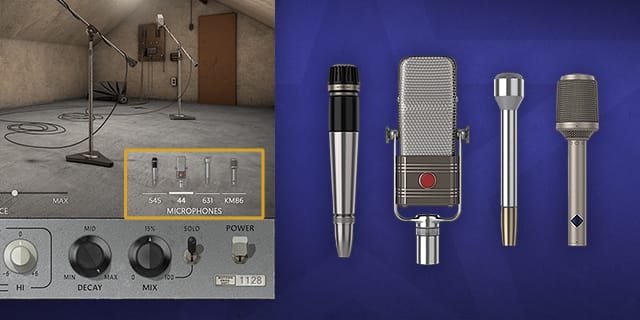
Shape Ambience with Simple Controls

Quickly get jaw-dropping reverb effects using Hitsville Reverb Chambers easy-to-use controls, including distinct speaker and mic selections in each chamber, to make your vocals, handclaps, tambourines, and triangles soar.
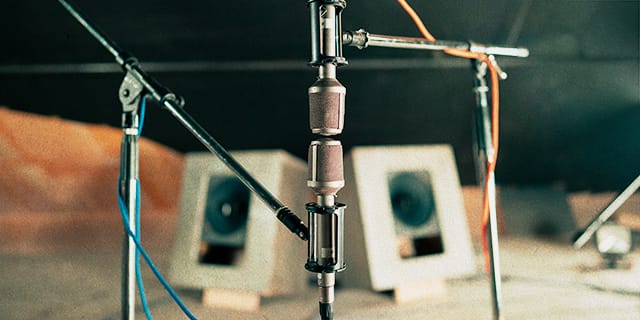
Reposition Mics with Dynamic Room Modeling

Go far beyond retro and get genre‑defying ambience by moving the chamber mics in realtime for presence and detail beyond the original hit‑making positions.

Features

  • Use any audio interface, with both UAD Native and Apollo Realtime/UAD-2 versions included
  • Get instant “Motown Sound” from the attic reverb chambers above the legendary Hitsville U.S.A. studio
  • Dial in rich-sounding ambience using two different custom-built chambers
  • Add iconic reverb to vocals, drums, and more quickly with simple controls
  • Reposition mics in realtime using UA's Dynamic Room Modeling

Versions Included with your Purchase

  • UAD Native: Runs on your Mac or PC without any UA hardware
  • Apollo Realtime & UAD-2: Runs accelerated on Apollo interfaces and UAD-2 hardware

System Requirements

  • macOS 10.15 Catalina, 11 Big Sur, 12 Monterey, 13 Ventura
  • Windows 10 or Windows 11 (64-bit only Editions)
  • Intel, AMD, or Apple silicon processor
  • Internet connection to download software and authorize UADx plug-ins
  • Free iLok account with iLok Cloud or iLok USB (2nd generation or higher)
  • A physical iLok dongle is NOT required to activate this product

DAW Compatibility

  • Pro Tools 2022 (AAX)
  • Logic Pro (Audio Units)
  • Ableton Live 11 (VST 3, Audio Units)
  • Cubase 12 (VST 3)
  • Studio One 5 (VST 3)
  • LUNA Recording System

You can activate this software on an online system (using iLok Cloud) or an offline system (using an iLok USB):

  1. Online: an active internet connection and a FREE iLok account are required to authorise UAD Plug-ins using iLok Cloud

  2. Offline: you will need a physical iLok USB (2nd generation or higher) to authorise this software

Important note: UAD plugins do not work in Apple's Garageband DAW

Installation Instructions

Registration

1. Click the Download button in your Plugin Boutique account or go to https://www.uaudio.com/my/account/redeem/.

2. Enter your email and the serial code found in your Plugin Boutique User Account > Click 'Get my Plug-in'.

3. Enter the details required to create your Universal Audio account > Click 'Create Account'.

4. Download UA Connect by clicking either 'macOS' or 'Windows' depending on the system you are using.

Windows Installation

1. Once the download is complete, extract and open the ZIP folder you just downloaded > Open the PC folder > Double-click the UA Connect.exe installer file.

2. Read the terms of agreement > Click 'I Agree'.

3. The installation of PACE License Support will now begin > Click 'Next >'.

4. Read the license agreement > Click 'Yes'.

5. Click 'Install'.

6. Click 'Finish'.

7.  Locate and open UA Connect > Enter the email address and password of your Universal Audio account.

8. Click 'GET STARTED'.

9. Select the option that is relevant to you - either 'I Already Have an iLok Account' or 'Create an iLok Account For Me'.

10. Enter your iLok account User ID then click 'LINK ACCOUNT'

.

11. Enter the password for you iLok account and click 'Authorize'.

12. Locate the plugin you wish to install > Click 'DOWNLOAD'.

13. Once the plugin has been installed, open your DAW and then the newly installed plugin.

Your software is now activated and ready to use in your DAW!

Mac Installation

1. Once the download is complete, double-click the UA Connect.dmg installer file.

2. Drag UA Connect into your Applications folder.

3. Locate and open UA Connect > Enter the email address and password of your Universal Audio account.

4. Click 'GET STARTED'.

5. Select the option that is relevant to you - either 'I Already Have an iLok Account' or 'Create an iLok Account For Me'.

6. Enter your iLok account User ID then click 'LINK ACCOUNT'

.

7. Enter the password for you iLok account and click 'Authorize'.

8. Locate the plugin you wish to install > Click 'DOWNLOAD'.

9. Once the plugin has been installed, open your DAW and then the newly installed plugin.

Your software is now activated and ready to use in your DAW!

Plugin Boutique Rewards

Discover the most rewarding loyalty programme among all plugin retailers.

  • Free Loopmasters Samplepacks
  • Discounts on products and courses
  • Extra Virtual Cash claimed immediately at checkout
Find out more

Follow us:

X (Twitter) Facebook YouTube Instagram
Logo Logo

Plugin Boutique Limited, Part of the Beatport Group LLC.

Copyright © 2011-2025 Plugin Boutique. All rights reserved