


 Log In
.jpg)
Free gifts available with your purchase
Endless, Lush, Dub-Style Delays And Psychedelic Spring Reverb
Now compatible with any soundcard on Mac and PC
In 1973, Roland created the RE-201 Space Echo* — a tape delay/spring reverb system that created warm, warped, unabashedly analog echo effects. From subtle tape textures to mindbending chaos, this iconic contraption can be heard on classic Pink Floyd and David Bowie, to seminal dub sides from King Tubby, Scientist, and Lee “Scratch” Perry.
The Galaxy Tape Echo plug-in is an exhaustive emulation of the iconic, legendary ’70s unit, and expertly captures the physical behavior of the inspiring hardware, down to its distortion, musical wow and flutter, sci-fi pitch shifting, and real time tweakability.
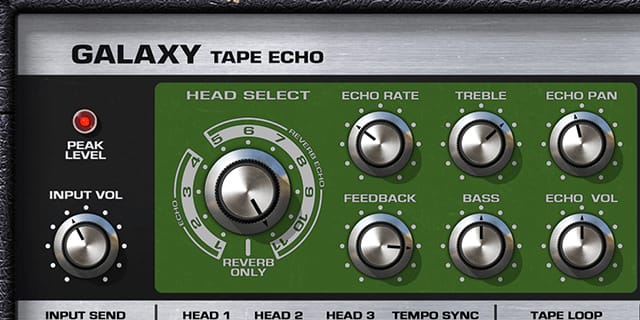
Space Is The Place
Universal Audio has painstakingly captured every quirk and characteristic of this complex device. For example, just like the hardware, you can drive the input hard to add hair to a vocal, or widen a drum bus with fat analog character. Tweak the controls and harness seemingly infinite wow and flutter and pitch shifting combinations — perfect for energizing electric guitars. From rockabilly slapback to hazey trails of swirling delay, the Galaxy Tape Echo is a secret sauce for any source in any genre.

A Faithful Reproduction — Warts and All
The Galaxy Tape Echo keeps the controls of the original hardware, and adds some for modern workflows. Use the original Mode Selector for various head combinations, Repeat Rate for timing control, and Intensity for repeats and self-oscillation. The Echo/Normal switch mutes the signal to the echo, while global Bass and Treble let you season to taste. New features include Tempo Sync, Pan controls for reverb and delay, and Tape Select, for varying delay timbres. By capturing the eccentricities of the original, and adding enhancements along the way, the Galaxy Tape Echo is a tool of infinite creativity.
Features
- Use any audio interface, with both UAD Native and Apollo Realtime/UAD-2 versions included
- Add subtle tape delay or colorful cacophony to drums, vocals, guitars, and synths
- Harness distortion, wow and flutter, and pitch shifting, for organic time-based effects
- Use wild-self-oscillation for creative sci-fi textures and moods
- Employ the ambient shimmer of spring reverb on any source
Versions Included with your Purchase
- UAD Native: Runs on your Mac or PC without any UA hardware
- Apollo Realtime & UAD-2: Runs accelerated on Apollo interfaces and UAD-2 hardware
- macOS Big Sur 11, Monterey 12, Ventura 13, Sonoma 14, Sequoia 15 and Tahoe 26
- Windows 10 or Windows 11 (64-bit editions)
- Intel, AMD, or Apple silicon processor
- Internet connection to download software and authorize UAD Native plug-ins (UADx)
- Free iLok account
- Compatible with iLok USB (2nd generation or higher) but not required
- Free UA Connect application for managing UAD Native plug-ins (UADx)
- A supported DAW compatible with VST3, AU, or AAX plug-in file formats.


